The hype of Samsung Galaxy S8 has been on a high trend for the past few weeks... I believe these leak images of iPhone is another stunt by Apple to still get back their position in market.
Be it as it may, iPhone 8 glassy feature is quite dope and will surely enthuse you!
Leaked iPhone 8 specifications shows that it has a vertically aligned dual-lens camera, used to replace the horizontally aligned one on the previous version.
This has been rumored before and it’s thought that the change could somehow be needed to help with rumored augmented reality functions of the phone.
Apparently the iPhone 8 specifications revealed that it has a dimensions of 143.5 x 70.9 x 7.7mm, which would make it slightly bigger in all dimensions than the 138.3 x 67.1 x 7.1mm iPhone 7, but smaller than the iPhone 7 Plus.
iPhone 8 launch date which will mark the 10th anniversary of iPhone will be this year and it’s shaping up to be a big update.
The iPhone 8 pictures showed the following:
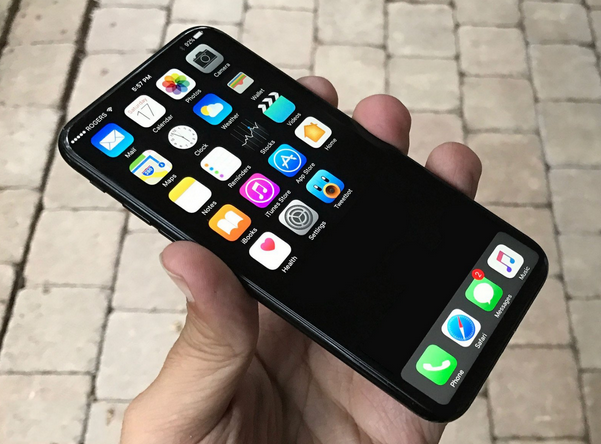
Despite the fact that it will have a much bigger screen than iPhone 7 Plus, with many current rumors pointing to a 5.8-inch display, achieved by removing the home button and having an all-screen front, as you can also see in the above image.
The price of iPhone 8 has not been announced yet.
The above video contains leaked pictures of iPhone 8. iPhone 8 images based on leaked factory CAD drawings show all glass design, thicker body.
Take a look at:
Google Home’s Assistant
OneDrive iOS client update
Gionee M6S Plus Specs
How to stream video attachments on Gmail
It's reasonable to understand that these iPhone 8 leaked images were based on leaked CAD images and may offer the most accurate look yet at what the iPhone 8 could look like.
Be it as it may, iPhone 8 glassy feature is quite dope and will surely enthuse you!
Leaked iPhone 8 specifications shows that it has a vertically aligned dual-lens camera, used to replace the horizontally aligned one on the previous version.
This has been rumored before and it’s thought that the change could somehow be needed to help with rumored augmented reality functions of the phone.
Apparently the iPhone 8 specifications revealed that it has a dimensions of 143.5 x 70.9 x 7.7mm, which would make it slightly bigger in all dimensions than the 138.3 x 67.1 x 7.1mm iPhone 7, but smaller than the iPhone 7 Plus.
iPhone 8 launch date which will mark the 10th anniversary of iPhone will be this year and it’s shaping up to be a big update.
The iPhone 8 pictures showed the following:
- A glass and stainless steel redesign with a bezel-less OLED display
- A new in-display Touch ID paired with facial recognition
- Updates to 3D Touch
- improved waterproofing
- wireless charging
- and much more.

Despite the fact that it will have a much bigger screen than iPhone 7 Plus, with many current rumors pointing to a 5.8-inch display, achieved by removing the home button and having an all-screen front, as you can also see in the above image.
The price of iPhone 8 has not been announced yet.
iPhone 8 leaked images
The above video contains leaked pictures of iPhone 8. iPhone 8 images based on leaked factory CAD drawings show all glass design, thicker body.
Take a look at:
Google Home’s Assistant
OneDrive iOS client update
Gionee M6S Plus Specs
How to stream video attachments on Gmail
It's reasonable to understand that these iPhone 8 leaked images were based on leaked CAD images and may offer the most accurate look yet at what the iPhone 8 could look like.
Comments
Post a Comment