The new opera browser now allows you to access your WhatsApp, Telegram and Facebook messenger.
Opera browser may not be the best browser ever known but we must applaud its consistency when it comes to innovation. Just yesterday, Opera launched a new functionality to its browser which enables direct access to WhatsApp, Facebook messenger and Telegram.
Opera has indeed rolled in these features which includes the latest addition of a messaging sidebar built directly into the browser interface.
From the sidebar, it is well integrated giving you an outlet to directly access your Facebook messenger, your WhatsApp, as well as your Telegram.
This way you don’t have to exit the opera for accessing the stated social media platform.
See image below:
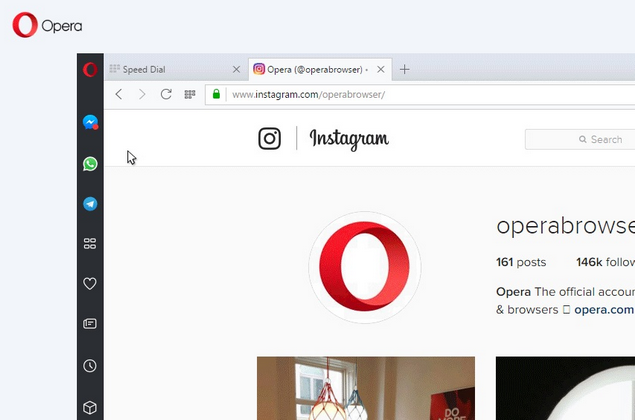
Although we can’t tell much of the efficiency of this browser would be with all these enticing features, it is even possible it may at the tail end appear crowded.
But it definitely would be surely heartwarming however to be able to access your social media platforms without leaving your browser.
The functionality is well welcomed considering that you don’t have to switch from your opera to your chats, you can have them now incorporated in one browser.
I would really applaud Opera for this, no hype, but it is typifying excellence on the side of Opera!
Source: Justnaira
Recommended
Gionee M6S Plus Specs
Opera Mini Browser Download
Features of Samsung Galaxy S8Wapdam com
Ecobank Mobile App
How to Get Loan without Collateral
MMM Nigeria Login
UC Browser App download
Opera browser may not be the best browser ever known but we must applaud its consistency when it comes to innovation. Just yesterday, Opera launched a new functionality to its browser which enables direct access to WhatsApp, Facebook messenger and Telegram.
Opera has indeed rolled in these features which includes the latest addition of a messaging sidebar built directly into the browser interface.
From the sidebar, it is well integrated giving you an outlet to directly access your Facebook messenger, your WhatsApp, as well as your Telegram.
This way you don’t have to exit the opera for accessing the stated social media platform.
See image below:

Although we can’t tell much of the efficiency of this browser would be with all these enticing features, it is even possible it may at the tail end appear crowded.
But it definitely would be surely heartwarming however to be able to access your social media platforms without leaving your browser.
The functionality is well welcomed considering that you don’t have to switch from your opera to your chats, you can have them now incorporated in one browser.
I would really applaud Opera for this, no hype, but it is typifying excellence on the side of Opera!
Source: Justnaira
Recommended
Gionee M6S Plus Specs
Opera Mini Browser Download
Features of Samsung Galaxy S8Wapdam com
Ecobank Mobile App
How to Get Loan without Collateral
MMM Nigeria Login
UC Browser App download
Comments
Post a Comment