How to Find Out Who Views My Profile On Facebook | Who Looks at My Facebook Profile? - Most users are interested in seeing which Facebook friend or user is viewing their Facebook profile.
While there are some programs and browser extension claiming that they can track who is stalking you on Facebook, there are some elements of scams in their activities.
Ensure that you don’t give any access to your account because it may compromise your Facebook privacy. View Facebook Blocked List
Unlike other social media, like LinkedIn, you can easily see who’s viewed your profile using the provided tool, but Facebook still not ready to show that feature, although many users wanted to have that.
Is there a way to find out who always viewing my Facebook profile?
While searching and finding a way to see who are checking Facebook profile or if it is possible, I came across in some popular way that are shared online.
Many videos with millions of views and popular pages, sharing the same instruction how to find out who is viewing your Facebook profile, they use InitialChatFriendsList.
This can be found when viewing the source code for your profile and the list of the numbers that follows is the list of ID’s that arranged from top which said the one who constantly viewing your profile.
I will tell you the truth this method is not exactly the list of people that are constantly viewing your profile, instead this is the list of friends that you have recently interacted with (in chat, message, comment thread).
Why I said this is not the list who recently check your profile? Because I tested it, I tell some of my friends to check my profile for some times and check if the list changed, it didn’t.
How to find InitialChatFriendsList
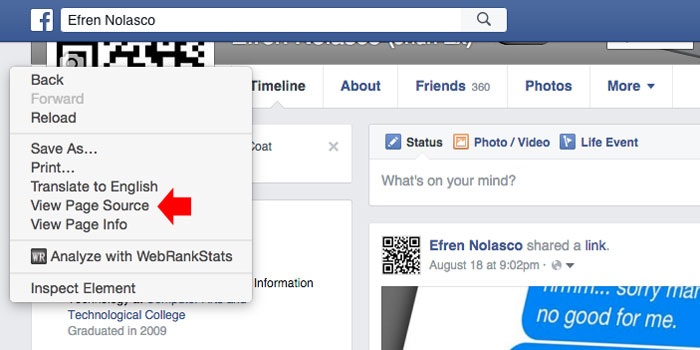
If you still wanted to check using the InitialChatFriendsList, I will share with you the steps. 1. On your Facebook Profile, perform right-click in the empty area on the side, then select “View Page Source”
 2. It will open the page source of your profile, to find the list simple press CTRL + F (Windows) or Command + F (Mac) and enter InitialChatFriendsList then press enter. You will be taken to the list of code which is Facebook ID’s of your friends.
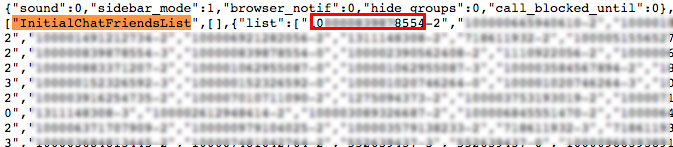
3. To convert numbers into Facebook profiles, simply put this into your browser address bar https://www.facebook.com/NUMBERID, and change the NUMBERID with the first group digit numbers that you find right after InitialChatFriendsList, do not include number after hyphen (-).

If you are checking source code, and it seems complicated to you, then, you can actually see this visually using chat window. If you are using Facebook in browser, you will see on right side your friends list. You can also use this to observe who you constantly chat with like the InitialChatFriendsList.
What you have to do is turn off the chat and then refresh your web browser, then turn it back on again using the gear icon. The first friend that appears on the top is most likely to be your Facebook friends that you recently interact with.
While there are some programs and browser extension claiming that they can track who is stalking you on Facebook, there are some elements of scams in their activities.

Ensure that you don’t give any access to your account because it may compromise your Facebook privacy. View Facebook Blocked List
Unlike other social media, like LinkedIn, you can easily see who’s viewed your profile using the provided tool, but Facebook still not ready to show that feature, although many users wanted to have that.
Is there a way to find out who always viewing my Facebook profile?
While searching and finding a way to see who are checking Facebook profile or if it is possible, I came across in some popular way that are shared online.
Many videos with millions of views and popular pages, sharing the same instruction how to find out who is viewing your Facebook profile, they use InitialChatFriendsList.
This can be found when viewing the source code for your profile and the list of the numbers that follows is the list of ID’s that arranged from top which said the one who constantly viewing your profile.
I will tell you the truth this method is not exactly the list of people that are constantly viewing your profile, instead this is the list of friends that you have recently interacted with (in chat, message, comment thread).
Why I said this is not the list who recently check your profile? Because I tested it, I tell some of my friends to check my profile for some times and check if the list changed, it didn’t.
How to find InitialChatFriendsList
If you still wanted to check using the InitialChatFriendsList, I will share with you the steps. 1. On your Facebook Profile, perform right-click in the empty area on the side, then select “View Page Source”
See:
2. It will open the page source of your profile, to find the list simple press CTRL + F (Windows) or Command + F (Mac) and enter InitialChatFriendsList then press enter. You will be taken to the list of code which is Facebook ID’s of your friends. 3. To convert numbers into Facebook profiles, simply put this into your browser address bar https://www.facebook.com/NUMBERID, and change the NUMBERID with the first group digit numbers that you find right after InitialChatFriendsList, do not include number after hyphen (-).
If you are checking source code, and it seems complicated to you, then, you can actually see this visually using chat window. If you are using Facebook in browser, you will see on right side your friends list. You can also use this to observe who you constantly chat with like the InitialChatFriendsList.
What you have to do is turn off the chat and then refresh your web browser, then turn it back on again using the gear icon. The first friend that appears on the top is most likely to be your Facebook friends that you recently interact with.
Comments
Post a Comment